Payment gateway for digital products: how to sell downloads, courses and software internationally
How to take payments for digital products internationally: who may sell them, delivering on the webhook, receipts, refunds, chargeback evidence and tax.
On this page
A payment gateway for digital products has a different job from one for physical goods. There is no shipping and no tracking number: the product is delivered the moment the payment is confirmed, the buyer can be anywhere in the world, and when a dispute comes, your proof of delivery is a download log, not a courier receipt. Getting those parts right matters more than the checkout itself.
This guide covers taking payments for digital products — downloads, online courses, software licences, memberships — with KukoPay: who can sell them, how to deliver automatically, receipts and refunds, the evidence that wins digital-goods chargebacks, and what a payment gateway does not do for you on tax.
Who can sell digital products?
- Companies — mainland companies, individually owned businesses and companies registered outside the mainland — can sell digital products once their business verification is approved. See what is KYB verification.
- Individuals verified without a business licence cannot choose digital goods / virtual content or online games as their category. If that is your business, verify as a business. See accepting international payments as an individual.
- Some digital products are prohibited for everyone: crypto and virtual assets, gambling, adult content, pirated or infringing content. See prohibited businesses.
Deliver digital products on the webhook
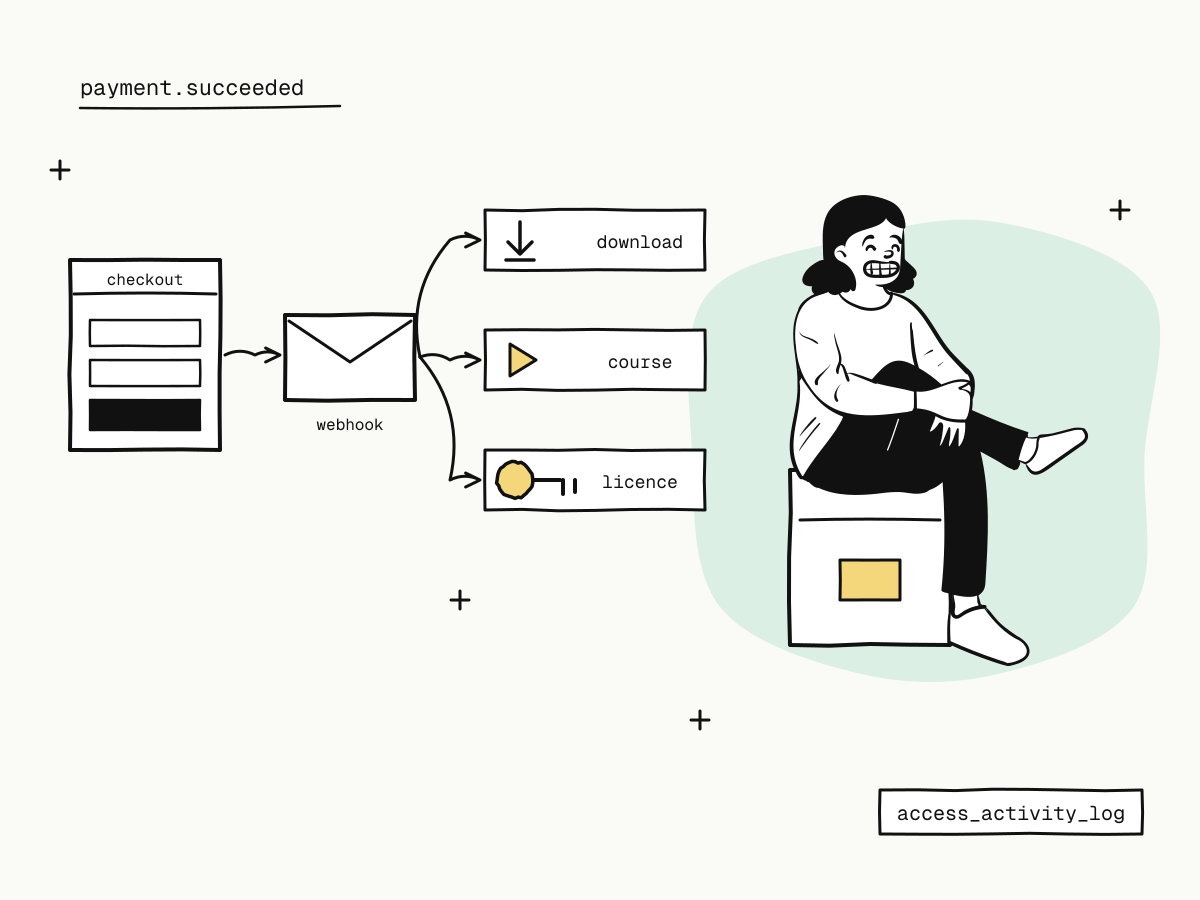
Digital delivery should be automatic and happen exactly once:
- Your server creates an order with your own
out_trade_noand redirects the buyer to thecheckout_url. - The buyer pays on the hosted checkout — card, Apple Pay, Google Pay, Alipay, WeChat Pay or PayPal, as enabled.
- KukoPay sends
payment.succeeded; your webhook handler verifies the signature, records the event id, and then grants access: creates the download link, enrols the student, issues the licence key. - The buyer returns to your success page, which reads the order's state from your server.
Never deliver on the buyer's return alone — it can be skipped or faked. See payment success page and payment webhook idempotency.
Put your own references on the order with metadata — the product, the user account, the licence tier — so the webhook has everything it needs to deliver. See payment metadata.
Prices and payment methods for international buyers
- Price in the buyer's currency where it matters: USD for most of the world, CNY for buyers in mainland China, HKD for Hong Kong. Each is its own balance and nothing is converted — see how to accept USD payments.
- Mind the fixed fee on cheap products. Standard pricing is 3.5% plus a fixed fee per payment ($0.30 on USD), so a $2 download pays a large share in fees; bundles or credit packs spread it. See how cross-border payment fees are calculated.
- Show the checkout in the buyer's language with
&locale=— see multilingual checkout.
Receipts and refund policy for digital products
- Send a receipt for every sale. Pass
receipt_emailon the order: the buyer gets a receipt with your name, the amount and a receipt number, and replies reach your business contact address. See payment receipts. - Write a refund policy that fits digital goods — for example, refundable until the download or course has been accessed, then only if faulty — and show it before payment. See refund policy for online stores.
- Refund when it is fair. A prompt refund costs less than a chargeback. Note that Alipay and WeChat Pay payments can only be refunded within a window given by the order's
refundable_until.
Chargebacks on digital goods: keep the evidence
Digital products attract "I did not receive it" and "I did not make this purchase" disputes, and the buyer's bank decides on evidence. Keep, for every order:
- Access records — when the download link was used, when the student logged in, which lessons were opened, when the licence was activated (
access_activity_log); - Who bought it — the buyer's email and the IP address of the purchase (
customer_email_address,customer_purchase_ip); - What they agreed to — the product description, the receipt and the refund policy shown before payment.
Submit evidence as a draft and send it before the deadline; no response counts as a loss. See the chargeback guide and friendly fraud.
Tax on digital products
Many countries tax digital products sold to their consumers, and the seller is responsible for it. KukoPay is a payment provider, not a merchant of record: it does not collect or file VAT, GST or sales tax for you, and its receipts are proof of payment, not tax invoices. If you sell digital products to consumers abroad, check your obligations in the markets you sell to and issue tax invoices from your own system where needed.
Summary
- A payment gateway for digital products must deliver automatically, on a confirmed payment, exactly once — deliver on the verified
payment.succeededwebhook; - companies can sell digital products; individuals cannot choose digital goods, virtual content or games, and some digital products are prohibited for everyone;
- price in the buyer's currency, watch the fixed fee on cheap items, and send a receipt for every sale;
- write a digital-goods refund policy, and keep access logs, buyer details and the agreed terms as chargeback evidence;
- KukoPay is not a merchant of record: tax on digital sales remains yours.
Try it in the sandbox
Create a merchant account and request a test key. The sandbox needs no business verification.