Node.js payment integration: accept payments in an Express app, from order to webhook
A Node.js payment integration with Express, step by step: create an order, redirect to checkout, verify the webhook signature, fulfil once and test it.
On this page
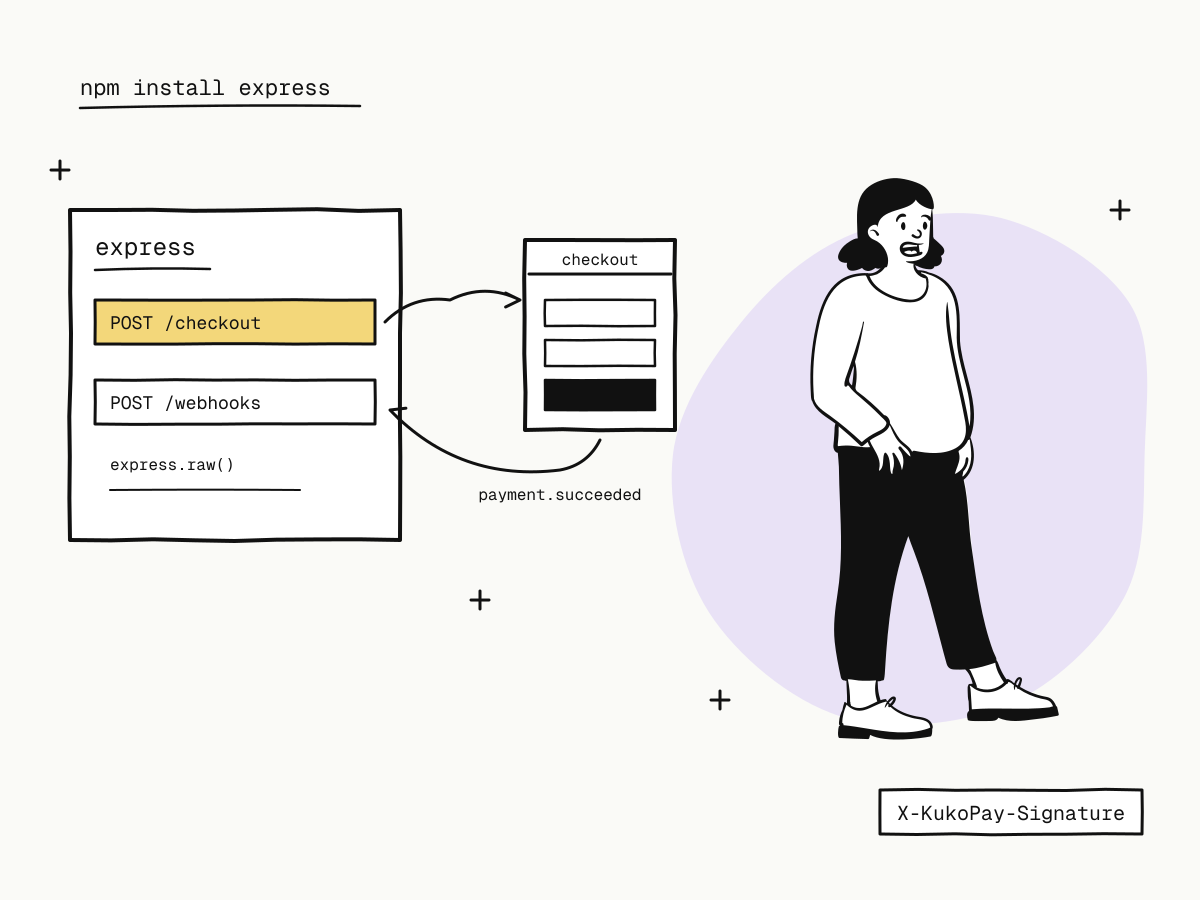
A Node.js payment integration needs only two routes on your server: one that creates an order and sends the buyer to the checkout, and one that receives the webhook telling you the payment succeeded. Everything in between — the card form, wallets, 3D Secure, retries after a decline — happens on the hosted checkout, so your Express app never handles card details.
This tutorial builds that integration with Express and KukoPay, step by step: setup, creating the order, the webhook route with signature verification, fulfilling exactly once, a fallback order lookup, and testing it all in the sandbox.
What you need
- Node.js 18 or later (for the built-in
fetch) and Express. - A sandbox API key (
kuko_test_…) from Developers → API keys — no business verification needed for the sandbox. See sandbox vs live mode. - A public HTTPS address for the webhook. On your laptop, a tunnel provides one — see how to test webhooks locally.
npm install express
export KUKOPAY_API_KEY=kuko_test_...
export KUKOPAY_WEBHOOK_SECRET=...   # the app's callback signing secret
export PUBLIC_URL=https://your-tunnel.example.com
The API key stays on the server — never in browser code. See API key in frontend code.
Step 1: create the order and redirect to checkout
import express from "express"
import crypto from "crypto"

const app = express()
const API = "https://api.kukopay.com/v1"

app.post("/checkout", express.json(), async (req, res) => {
  const order = await db.orders.create({ product: req.body.product, amount: 2990 }) // your own order
  const r = await fetch(`${API}/orders`, {
    method: "POST",
    headers: {
      "Content-Type": "application/json",
      "X-Api-Key": process.env.KUKOPAY_API_KEY,
      "Idempotency-Key": `create-${order.id}`,
    },
    body: JSON.stringify({
      out_trade_no: order.id,
      amount: order.amount,           // integer cents: 2990 = $29.90
      currency: "USD",
      subject: "Pro plan, 1 year",
      notify_url: `${process.env.PUBLIC_URL}/webhooks/kukopay`,
      return_url: `${process.env.PUBLIC_URL}/orders/{OUT_TRADE_NO}/complete`,
    }),
  })
  const body = await r.json()
  if (!r.ok) {
    console.error("create order failed", body.request_id, body.error)
    return res.status(502).json({ error: "checkout_unavailable" })
  }
  await db.orders.update(order.id, { trade_no: body.data.trade_no })
  res.json({ checkout_url: body.data.checkout_url })
})
The details that matter:
- Your order id is the
out_trade_no, so a retry returns the same order instead of a second one — see what is an idempotency key. - The amount comes from your server, as an integer in cents — see why payment APIs take the amount in cents.
notify_urlsends this order's webhooks to your route, signed with the app's callback signing secret.- Log
request_idon failure; it is what finds the call in your API logs — see payment API error handling.
The browser then sets window.location to checkout_url.
Step 2: receive and verify the webhook
Mount the webhook route with express.raw so you verify the exact bytes that were signed:
function verify(rawBody, header, secret) {
  const parts = header.split(",").map((p) => [p.slice(0, p.indexOf("=")).trim(), p.slice(p.indexOf("=") + 1).trim()])
  const t = parts.find(([k]) => k === "t")?.[1]
  const sigs = parts.filter(([k]) => k === "v1").map(([, v]) => v)
  if (!t || !sigs.length || Math.abs(Date.now() / 1000 - Number(t)) > 300) return false
  const expected = Buffer.from(crypto.createHmac("sha256", secret).update(`${t}.${rawBody}`).digest("hex"))
  return sigs.some((s) => { const b = Buffer.from(s); return b.length === expected.length && crypto.timingSafeEqual(b, expected) })
}

app.post("/webhooks/kukopay", express.raw({ type: "application/json" }), async (req, res) => {
  const raw = req.body.toString("utf8")
  if (!verify(raw, req.get("X-KukoPay-Signature") || "", process.env.KUKOPAY_WEBHOOK_SECRET)) {
    return res.status(400).end()
  }
  const event = JSON.parse(raw)
  if (event.test) return res.status(200).end()       // test webhooks: acknowledge, never fulfil

  await handleEvent(event)
  res.status(200).end()
})
Accept a match on any v1: during a secret rotation the header carries two. See how to verify webhook signatures.
Step 3: fulfil exactly once
async function handleEvent(event) {
  await db.transaction(async (tx) => {
    const fresh = await tx.events.insertIfAbsent(event.id)   // unique constraint on event id
    if (!fresh) return                                        // already processed
    if (event.type === "payment.succeeded") {
      const o = event.data.object
      await tx.orders.markPaid(o.out_trade_no, { trade_no: o.trade_no, amount: o.amount })
      await tx.jobs.enqueue("fulfil", { orderId: o.out_trade_no })
    }
  })
}
Record the event id and the state change in one transaction, so a retried webhook cannot fulfil twice, and move slow work (emails, provisioning) to a queue so the route answers within 10 seconds. See payment webhook idempotency.
Step 4: a fallback order lookup
When the buyer lands on your success page before the webhook, or a webhook was missed, ask KukoPay directly:
async function orderStatus(outTradeNo) {
  const r = await fetch(`${API}/orders/${encodeURIComponent(outTradeNo)}`, {
    headers: { "X-Api-Key": process.env.KUKOPAY_API_KEY },
  })
  return (await r.json()).data.status   // "pending" | "paid" | "expired" | "failed" | …
}
Use it to show the right state on the success page, not to fulfil — see payment success page.
Step 5: test it in the sandbox
- Start the app and the tunnel, then create an order through
/checkout. - Pay at the checkout with the test card
4242 4242 4242 4242, any future expiry and any CVC — and try a decline with4000 0000 0000 0002. See test credit card numbers. - Watch
payment.succeededarrive, then return500once on purpose and check that the retry is deduplicated. - Use Send test webhook and the signature self-check in the dashboard if verification fails.
Going live is a key swap: replace the kuko_test_ key and the sandbox signing secret with the same app's live values. Nothing else in the code changes.
Summary
- A Node.js payment integration needs two Express routes:
POST /checkoutto create the order and returncheckout_url, and a webhook route; - create orders server-side with your order id as
out_trade_no, an integer amount and anIdempotency-Key; - mount the webhook with
express.raw, verifyX-KukoPay-Signatureon the raw body, and acknowledge test webhooks without acting; - record the event id and fulfil in one transaction; use the order lookup only to display status;
- test with sandbox keys, test cards and a tunnel, then switch to live keys.
Try it in the sandbox
Create a merchant account and request a test key. The sandbox needs no business verification.